Save Frolic TCR: What Do the Two Calibration Values Mean?
- On the Frolic calibration screen, you will see the current resistance of the heating coil at the top and the TCR value at the bottom.
- Both are saved simultaneously: with 5 quick clicks in the calibration menu.
- Limelight recommends the TCR range from 94 to 96, with 96 as the default value, and calibration only when the device has cooled completely.
- Intentionally saving the Frolic while warm at 0.110 / 96 is a community tweak: It makes the device more aggressive, but it is not recommended by the manufacturer.
The Limelight Frolic regulates its temperature through the resistance of the heating coil. In the hidden calibration menu, you set two values for this, and when you save them, the Frolic applies both simultaneously: the currently displayed resistance as the new cold resistance and the configured TCR. Saving while the device is too warm shifts the entire temperature calculation.
This guide shows the official procedure from Limelight and explains the reasoning behind the 0.110 / 96 setting commonly used in the community.
Frolic Calibration: What Do the Two Values in the Menu Show?
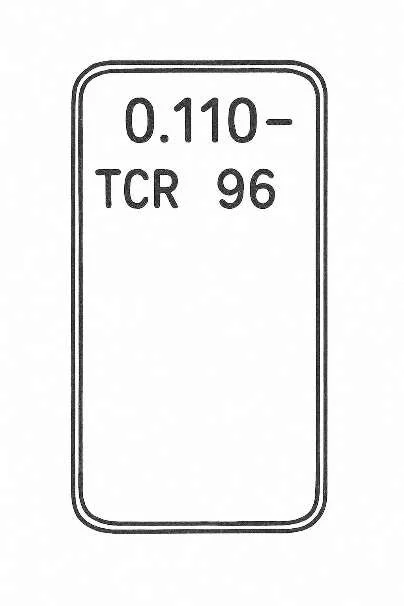
Figure: Limelight, TCR Value Disclaimer & Calibration (PDF, version 2.0, March 2026), page 2
Value 1: current resistance of the heating coil
The upper number is neither a temperature value nor a profile. It shows the currently measured resistance of the coil in ohms. The official Limelight PDF specifies a value of at least 0.105 ohms for a cooled-down Frolic; the example display shown there reads 0.110 ohms. This cold baseline value is important because the device uses it as the starting point for its temperature calculation.
Value 2: TCR
TCR stands for Temperature Coefficient of Resistance. Put simply, this value describes how much the coil’s resistance changes as the temperature rises. The Frolic uses this relationship to regulate heating power. According to Limelight, the TCR for the Frolic should remain within the 94 to 96 range.
The relationship between the two values is important: The Frolic does not estimate the coil temperature from the TCR alone, but from the TCR plus the saved cold baseline resistance. That is why a Frolic with the same TCR but a different baseline resistance can feel completely different.
Save Frolic TCR: What Exactly Is Saved?
This is the biggest pitfall. Saving in the calibration menu does not apply only the lower TCR value. With 5 clicks, the Frolic simultaneously saves:
- the currently displayed resistance as the new cold resistance
- the configured TCR value as the new control profile
If the device is too warm and the upper display shows a significantly higher resistance, for example, you will unintentionally save an incorrect cold resistance. This is exactly why Limelight insists on room temperature in the PDF, and why the Reddit tweak involves deliberately saving the resistance at precisely the right moment.
Frolic Calibration Step by Step: How to Save the TCR Correctly
- Allow the Frolic to cool down completely. Limelight specifies a room temperature of 22 to 24 °C as the reference. If you want an accurate calibration, the device should be completely cold.
- Turn off the device.
- Open calibration mode. Hold Power + Plus for approximately 10 seconds until the Frolic vibrates.
- Open the TCR screen. Press the power button 3 times quickly. The screen displaying the resistance value and TCR will now appear.
- Set the TCR. For an official calibration, stay within the 94 to 96 range.
- Check the resistance. If the device is completely cold, the upper value should be approximately 0.11 ohms.
- Save. Press the power button 5 times quickly to save the values currently displayed and exit the menu.
The official procedure is actually simple: start cold, set the TCR, and save when the displayed resistance is plausible. It only becomes complicated if you do not understand that the upper number is part of the calibration.
Frolic 0.110 / 96: How Does the Well-Known Reddit Tweak Work?
The community post on Reddit takes advantage of this exact mechanism. The idea is to briefly heat the Frolic, quickly enter calibration mode, and wait there until the decreasing resistance reaches the desired target value again. In the post, the target is usually 0.110 / 96. Variations also mention 0.109 / 96, 0.108 / 96, or 0.110 / 94 for certain setups.
The reasoning is simple: Depending on the cold resistance you save, the Frolic interprets its coil temperature differently. This can cause the device to deliver power sooner or more aggressively. Users describe the result as hotter, punchier, and more responsive. At the same time, however, the risk of harsh vapor, darker AVB, or, in extreme cases, combustion increases.
Important: This is a community tweak, not an official recommendation from Limelight. The manufacturer specifies a TCR range from 94 to 96, with 96 as the default value, and a cold resistance of around 0.11 ohms. Anything deliberately optimized for more punch is done at your own risk. Limelight also warns that if the display shows DEVICE TOO HOT, you should stop using the device and contact support because repeated overheating damages the heater and leads to the CHECK HEATER error message.
Which Frolic TCR Values Are Considered Normal?
| Value | Meaning | Assessment |
|---|---|---|
| approx. 0.11 ohms | Cold coil resistance | Official reference value according to the Limelight PDF |
| 94-96 | TCR range | Official manufacturer recommendation, default value 96 |
| 0.110 / 96 | Community reference for a hotter Frolic | Example display in the Limelight PDF; when intentionally saved as the target value, it is a community tweak |
| 0.109 / 96 | Slightly milder than 0.110 / 96 | Community variation |
| 0.108 / 96 | Slightly softer still | Community variation |
At first glance, the small difference between 0.108, 0.109, and 0.110 may seem insignificant, but it has a noticeable effect on performance. One thousandth of an ohm noticeably shifts the Frolic’s temperature calculation: A higher saved cold resistance causes the Frolic to estimate a lower coil temperature, so it heats more powerfully at the same setting; that is why 0.108 is considered softer than 0.110.
Why Does the Frolic TCR Sometimes Jump by 1 When Opened?
This is not a defect. Limelight states in the official PDF that when entering via Power + Plus, the displayed TCR value may appear to be 1 higher than the value actually saved. The same effect is also described in the Reddit discussion. In practice, this simply means: Before saving, deliberately reset the desired final value instead of relying on the initial display.
The Most Common Mistakes When Saving the Frolic TCR
1. Calibrating while the device is too warm.
If the coil is still warm, the resistance will be too high. Saving it in that state shifts the entire control baseline.
2. Looking only at the TCR.
Many people think the upper number is merely informational. In reality, it is the second half of the calibration.
3. Saving at the wrong moment.
With the community tweak, the exact moment when the resistance reaches the target value is crucial.
4. Forcing values outside the manufacturer’s intended parameters.
Anyone who simply chases hotter setups without a clear understanding risks overheating, harsh vapor, or unpredictable device behavior.
Our Assessment
If you simply want to restore the Frolic to a sensible state, the official approach is sufficient: calibrate it cold, use a TCR of 94 to 96, and ensure the resistance is approximately 0.11 ohms. If you specifically want to understand why many users talk about 0.110 / 96, the key insight is not the value itself but the underlying principle: You are saving a reference for the temperature calculation, not just a number in a submenu.
This also explains why an incorrectly saved Frolic may suddenly become far too aggressive at moderate temperature settings or, conversely, noticeably sluggish.
FAQ
What is the upper number in the Frolic calibration menu?
It is the currently measured resistance of the heating coil. On a cold Frolic, it should be approximately 0.11 ohms.
What is the TCR value?
It is the temperature coefficient of resistance. It determines how the Frolic translates changes in resistance into temperature and heating behavior.
How do I save the values?
In the calibration menu, press the power button 5 times quickly. This saves both the displayed resistance and the configured TCR.
Are the values retained after restarting the device or replacing the battery?
Yes, after saving with 5 clicks, the calibration is retained. The official Limelight procedure treats the values as the new device calibration from that point onward, and the community thread explicitly mentions that they also persist between battery replacements.
What does the 0.110 / 96 combination mean for the Frolic?
In the community, this usually refers to a saved cold resistance of 0.110 ohms combined with a TCR of 96. Many users describe it as a hotter, more direct Frolic tuning.
Is 0.110 / 96 an official Limelight value?
Only in part. Limelight specifies TCR 96 as the default value, and the example display in the manufacturer’s PDF shows 0.110 / 96. However, Limelight does not specify a target resistance: The value measured by the cold Frolic should be saved. Limelight does not recommend saving the Frolic while warm until the display reaches 0.110, as in the Reddit tweak.
Why should the Frolic be cold during calibration?
Because resistance increases as the temperature rises. Only when cold is the baseline value plausible and suitable for use as a reference.
Sources: Limelight Herb: TCR Value Disclaimer & Calibration (PDF, version 2.0, March 2026) · Reddit: Frolic Calibration Tweaks