XMAX V3 Pro Getting Started Guide: Everything You Need From Day One
The XMAX V3 Pro heats up in 10 seconds, runs on a swappable 18650 battery, and supports dosing capsules. For a good first Session, three things matter: remove the protective tab in the battery compartment, pack the chamber loosely, and start at a suitable temperature. This guide covers everything: initial setup, operation, temperature zones, Session vs. on-demand mode, dosing capsules, battery swapping, and cleaning — so you get good vapor from the very first draw.
At a Glance
- XMAX V3 Pro (from 58.44 € Code VAPOCHECKER5 · incl. shipping): convection, approximately 10 seconds heat-up time, swappable battery
Key Takeaways
- Fully charge the battery before first use and remove the protective tab in the battery compartment.
- Turn the V3 Pro on or off with three quick clicks of the power button.
- Pack the stainless-steel chamber loosely and not above the rim; packing it tightly restricts airflow.
- Session mode runs for four or six minutes. In on-demand mode, hold the power button during your draw for a maximum of 30 seconds.
- Let the device cool down completely before a deep clean and never submerge the body in liquid.
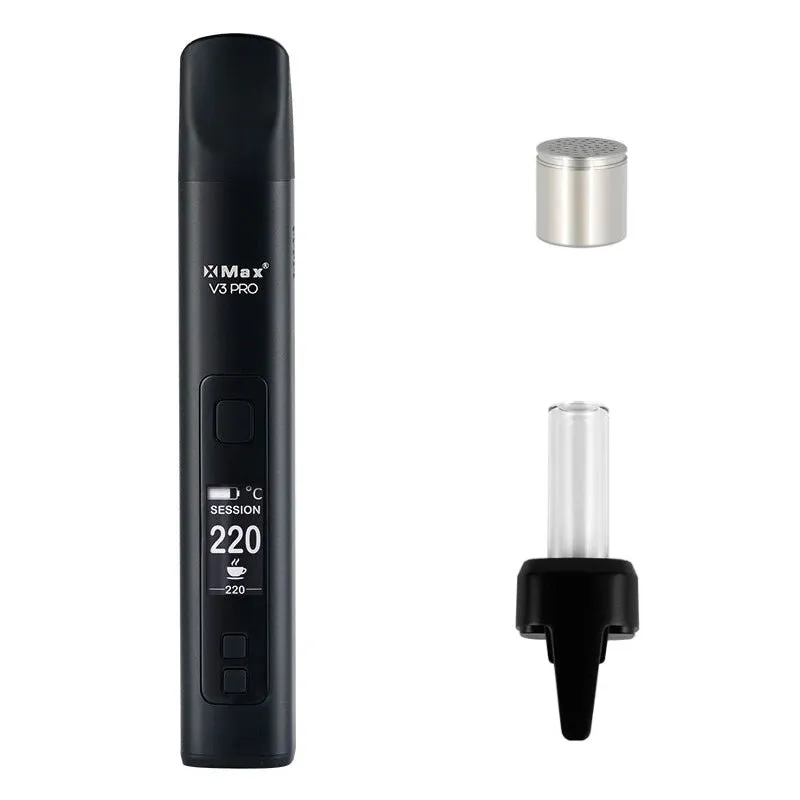
Getting started or comparing devices: which page will help you?
Do you already have the XMAX V3 Pro? This guide explains filling, operation, and cleaning. If you are still deciding whether to buy or upgrade, the comparison of XMAX V3 Pro and V4 Pro shows the differences. You can find current offers on the V3 Pro product page.
Before you begin, check the model name on the device and packaging: This guide covers the V3 Pro. The V3 Nano and V4 Pro are different models; do not apply their operating instructions or battery specifications to the V3 Pro. For special editions and bundles, the actual package contents also matter.
What’s in the box?
The standard contents according to the XMAX manual consist of the V3 Pro with an 18650 battery installed, a USB-C cable, a wax cup for concentrates, a cleaning brush, alcohol pads, cotton swabs, and a manual. Retailer bundles and special editions may include additional items. A glass bubbler or dosing capsules are therefore not automatically included in every box.
When unboxing, check the battery compartment first. There is a protective tab inside that must be removed before use. Then charge the battery fully using the included USB-C cable. The display stays on once charging is complete.
Related: XMAX V3 Pro vs V4 Pro
What should you do before first use?
The XMAX manual does not require multiple burn-off cycles before first use. It lists two clear steps: remove the protective tab in the battery compartment and fully charge the device. Also check that the chamber, screen, and mouthpiece are clean and dry.
An empty heating cycle is recommended by the manual after cleaning with isopropyl alcohol: let the device dry completely, then heat it empty at maximum temperature for approximately two minutes. This vaporizes any remaining alcohol residue. Do not inhale during an empty cleaning cycle.
If a new device has an unusually strong smell despite clean, dry parts, do not simply continue using it. Turn it off, let it cool, and contact your retailer or XMAX support. A specific safety concern should not be masked by running an arbitrary number of heating cycles.
How does operation work?
The V3 Pro has a power button, plus and minus buttons, and an OLED display. The key controls are listed directly in the manufacturer’s manual:
| Button / Action | Function |
|---|---|
| Power button 3 quick clicks | Turn device on or off |
| Press or hold plus / minus | Adjust target temperature by one step or quickly |
| Plus + minus pressed simultaneously once | Switch between Session and on-demand mode |
| Power + plus held for 2 seconds | Switch Session timer between 4 and 6 minutes |
| Power + minus held for 2 seconds | Switch between Celsius and Fahrenheit |
In Session mode, the device begins heating to the last-used temperature after being switched on. In on-demand mode, you hold the power button during your draw for a maximum of 30 seconds. The display shows battery level, target and current temperature, mode, and timer.
How should you pack the chamber?
Remove the magnetic mouthpiece and place ground material loosely into the stainless-steel chamber. The XMAX manual explicitly warns against filling above the top rim or packing too tightly. Air must be able to flow through the material because the V3 Pro uses convection heating.
A medium grind is a good starting point: very coarse material heats unevenly, and very fine material can clog the screen more quickly. Level the fill at the rim without compressing it, then replace the mouthpiece.
The device reaches the target temperature in approximately 10 seconds depending on the setting. XMAX states a heat-up time of around 10 seconds at 180 °C; higher target temperatures may take longer.
See also: XMAX V3 Pro review
What temperature should you start with?
The adjustable range of the V3 Pro runs from 100 to 220 °C. For a first session, 190 °C is a practical, deliberately conservative starting point: you can then adjust in 5 °C increments based on flavor, vapor density, and draw speed.
| Range | Practical overview |
|---|---|
| 160–180 °C | lighter vapor and more flavor |
| 180–200 °C | balanced starting range |
| 200–220 °C | denser and warmer vapor; draw slowly |
These ranges are operating guidelines, not medical dosing instructions and not exact boiling-point thresholds. XMAX confirms the device range of 100–220 °C; which setting feels comfortable depends on material, fill, and draw technique.
Session mode vs. on-demand mode — which should you use?
In Session mode, the V3 Pro maintains the target temperature for four or six minutes. This mode works well when you want to take several draws in a row. You switch the timer length by holding power + plus for two seconds.
In on-demand mode, the device heats as long as you hold the power button. A draw may last a maximum of 30 seconds according to the manual. After 30 seconds of no use, the device enters standby and shuts off after another 120 seconds.
Which is the right choice? Use Session for multiple draws in a row and on-demand for single draws with breaks in between. You can switch by pressing plus and minus simultaneously once.
How do you use dosing capsules?
Dosing capsules are compatible accessories, but they are not included in the standard contents of every V3 Pro version. Fill the cooled capsule loosely, put the lid on, and place it in the empty chamber. It should sit flush without any pressure.
Never remove a hot capsule with your fingers. Turn the device off, let the capsule and chamber cool down, and only then use a suitable tool. If the lid is stuck due to residue, clean the fully cooled capsule according to the accessory manufacturer’s instructions rather than forcing it open inside the device.
Capsules keep the chamber cleaner and allow pre-portioning, but they can alter airflow. If your draw becomes noticeably harder, check fill level, the lid, and the screen.
Find accessories: Dosing capsules & accessories compatible with the XMAX V3 Pro
How long does the battery last, and how do you swap it?
The V3 Pro uses a swappable 18650 lithium-ion battery rated at 3.7 V. Runtime depends heavily on temperature, timer, and mode; a fixed number of draws per charge would therefore be only a rough estimate.
Turn the device off and let it cool before swapping. Open the battery door, remove the cell using the designated pull tab, and observe the polarity marked inside the compartment when inserting a new cell. Only use a suitable, undamaged 18650 cell from a reputable supplier. A torn wrapper, dents, or corrosion are grounds for rejection.
The manufacturer’s manual specifies 18650, 3.7 V, and 2,600 mAh as the device specification; it does not give blanket approval for every available 18650 cell or every capacity. If in doubt, ask your retailer or XMAX support. Never transport loose batteries together with keys or coins, and use an insulating battery case.
Charging is via USB-C at 5 V / 1 A. Let the device and battery cool after use or charging before storing, and do not store the battery at a very low charge level for extended periods.
How do you clean the V3 Pro?
Turn the V3 Pro off and let it cool down completely before a deep clean. The manual recommends waiting at least 30 minutes after use. Never submerge the device in water and do not put any liquid or oil directly into the stainless-steel chamber.
Regularly:
- Remove the cooled mouthpiece and brush loose material out of the chamber.
- Disassemble the mouthpiece and filter. Clean the plastic mouthpiece with water and soap.
- Wipe out the stainless-steel chamber with the brush and, if needed, with a cotton swab only lightly dampened with isopropyl alcohol.
Deep clean: Removable parts other than the plastic mouthpiece can be soaked in isopropyl alcohol for 10–20 minutes according to the manual. Rinse with clean water afterwards and let everything dry completely. The plastic mouthpiece is not soaked in IPA.
After an IPA cleaning, the manual recommends an empty heating cycle at maximum temperature for approximately two minutes. Do not inhale during this cycle. Only fill the device once there is no alcohol smell left and all parts are dry.
Go deeper: Conduction vs. Convection vs. Hybrid
Specifications at a glance
| Heating type | Convection |
| Temperature range | 100–220 °C |
| Heat-up time | approximately 10 s, depending on the target temperature |
| Battery | 18650, replaceable; 2,550 mAh according to the manual, 2,600 mAh according to TopGreen’s support page |
| Weight | 105 g |
| Dosing capsules | compatible accessory (Yes) |
| Charging | USB-C, 5 V / 1 A |
| Warranty | 1 year |
| Current price | From 58.44 € Code VAPOCHECKER5 · incl. shipping |
Price history (30 days)
Frequently asked questions
Do I need to do a burn-off before first use?
The XMAX manual does not require an initial burn-off. Remove the protective tab, fully charge the battery, and make sure the chamber and mouthpiece are clean and dry. After cleaning with isopropyl alcohol, however, the manual recommends running an empty two-minute heating cycle at maximum temperature.
Why is my draw resistance so high?
The chamber is usually packed too tightly or the screen is clogged. Loosen the fill, stay below the chamber rim, and clean the cooled screen with the brush. Convection heating requires unobstructed airflow.
Which mode works better: Session or On-Demand?
Session maintains the temperature for four or six minutes and suits multiple draws in a row. On-Demand only heats while the power button is held down and suits single draws with breaks in between.
Can I use any 18650 battery in the V3 Pro?
No. The manual specifies 18650, 3.7 V, and 2,600 mAh, but does not approve every cell available. Use only a suitable, undamaged cell from a reputable source, observe the polarity, and consult your retailer or the manufacturer if in doubt.
How do I know when the chamber is spent?
The vapor becomes thinner and the flavor noticeably more toasted. Evenly browned material is normal; black spots indicate too high a temperature, too slow an airflow, or localized overheating.
What’s next?
After fully charging, removing the protective tab, and loosely packing your first load, you can start at around 190 °C. Use Session for multiple draws or On-Demand for single draws with breaks. Then fine-tune the temperature in small increments.
Check current prices across all shops: the V3 Pro is currently available from 58.44 € Code VAPOCHECKER5 · incl. shipping. We update the deals daily; that said, you should still compare the contents of the box and retailer bundles individually before buying.
Related guides: XMAX V3 Pro price comparison | V3 Pro vs V4 Pro — which model is worth it? | Compare all vaporizers